Data residency at Airtable
Last updated: August 20, 2026
Plan availability | Enterprise Scale |
Platform(s) | Web/Browser, iOS app, Android app, Mac app, and Windows app |
Related reading | |
Airtable terminology |
|
Customers on Enterprise Scale plans can choose to enable data residency to store some of their organization's data at rest in their preferred region. Airtable offers data residency in the United States (default), Europe, and Australia. Selecting a non-US region may result in slower performance than the US, as latency can vary depending on your chosen data center.
Choosing a data region
Your organization's data region is configured at the organization level. Once enabled, all new bases are created and stored in your chosen region. If you're an existing customer, your account team will coordinate the migration of existing bases to your preferred data center.
Data residency is set at the organization level. Organizations cannot span multiple data regions (e.g., you cannot have some bases in Europe and others in Australia within the same organization).
How can I tell where data is stored?
Users with admin permissions
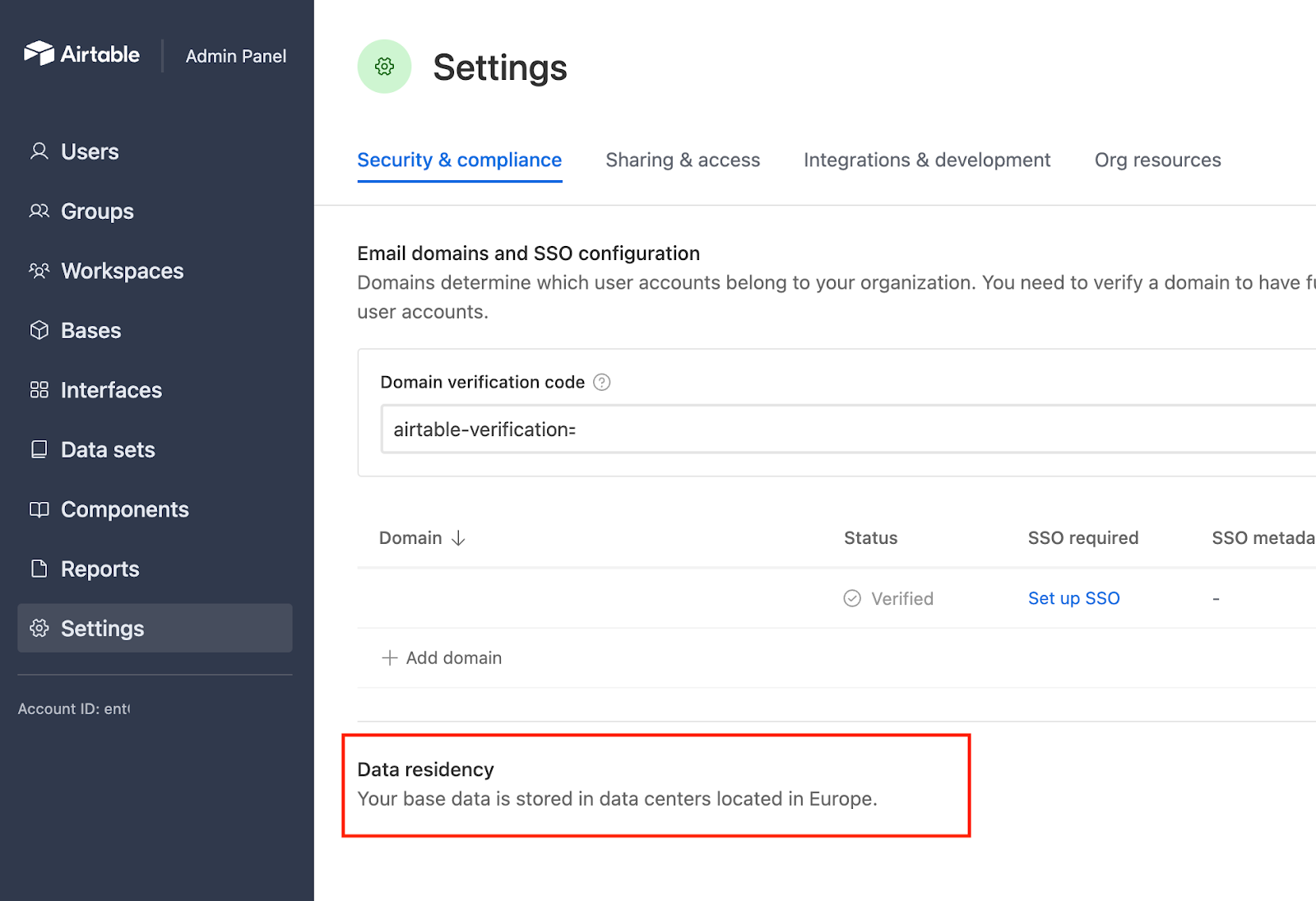
Once data residency is enabled, admins can access the “Security & Compliance” tab of the settings in the admin panel and view where their base data is stored.
The admin panel reflects your organization's settings for existing customers who recently enabled data residency but does not indicate if all bases have been migrated to your chosen data center. Your account team will confirm when migration is complete.
Users with base permissions
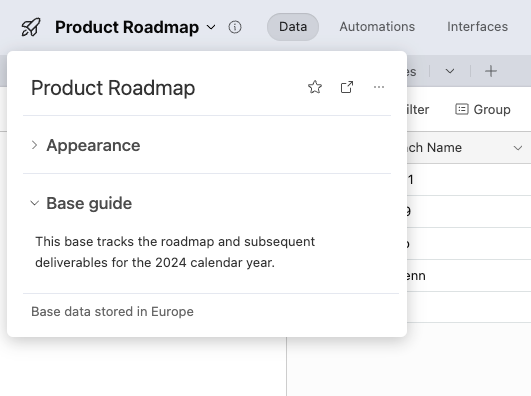
Users with base access can view whether their base data is stored in a specific data center by clicking the "Base guide" next to the name of the base. This indicator is only present after a base is configured to store existing and future data in that region's data centers.
What data is stored in your chosen region?
The following data is stored at rest in your organization's selected data center:
In-base data (Cell content, field names, table & field descriptions, etc.)
Attachments
Record revision history and snapshot data
Enterprise audit log data, eDiscovery exports, and Data Loss Prevention logs
What data remains in US data centers?
Regardless of your chosen data region, the following data is stored in US-based data centers:
Base metadata (Base or interface names, base descriptions, scripts, access requests, etc.)
Workspace metadata (Workspace name)
User and authentication data (Usernames, password hashes, OAuth token data, etc.)
Enterprise metadata (Organization name, custom branding, etc.)
Airtable analytics and support (Sanitized logs to run the service).
Data migration
Migrating bases from workspaces without data residency enabled to data residency-enabled workspaces is not supported.
Enterprise Scale customers with a data residency plan enabled cannot downgrade to another plan at the end of their contract. Upon termination or expiration of the contract, Airtable will delete all in-product data from Airtable's systems, applications, databases, and servers.
After enabling data residency, all new bases are created and stored in your chosen region. Any existing bases must be migrated from the US to your preferred data center. Keep in mind that migration requires some downtime for data to be moved to the correct data center—your account team will coordinate the migration details with you.
Data Residency and the Emailed data sync feature
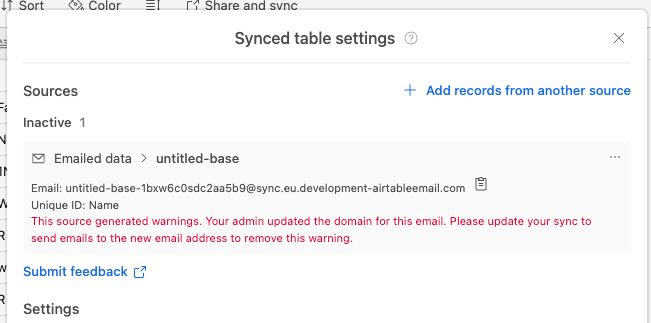
If you currently use email-based sync capabilities, your organization's email address for specific syncs needs to be updated from a US-based to an EU or AU email address.
European end users will see a prompt to update the sync email to an email that ends in "
@sync.eu.airtableemail.com"Australian end users will see a prompt to update the sync email to an email that ends in "
@sync.au.airtableemail.com"
You will need to contact the sync owners to update their settings. Syncs that are not updated will continue to use US-based email addresses and temporarily store emailed CSVs in the US. Warning in the sync configuration window:
Feature limitations
Some functionality is unavailable to customers with data residency enabled:
Organization-wide features
Enterprise Key Management
Enterprise Hubs with org units spanning multiple data regions
Transferring base ownership outside of your organization
Duplicating bases is still enabled
Base-specific limitations
Some first-party and third-party extensions do not store data in your chosen data center
Workspace downgrades
As a reminder, Data Residency is available only on Enterprise plans. Therefore, workspaces within organizations that have the Data Residency feature enabled cannot be downgraded to non-Enterprise plans.
Product behavior and enterprise admin controls
Once existing data is migrated, all syncs within your organization are stored in the same region. By default, new organizations are created with the ability to sync outside of your organization being disabled. If you enable syncing to bases outside your organization, that data may be synced to bases that are not stored in your chosen data center.
Organization admins can use the "Reports" page in the admin panel to audit all syncs configured in their organization and control global settings around enabling sync outside their organization.
Extensions - Some extensions connect your base to third-party systems. These admin panel settings permit admins to allow or disallow specific extensions and third-party access.
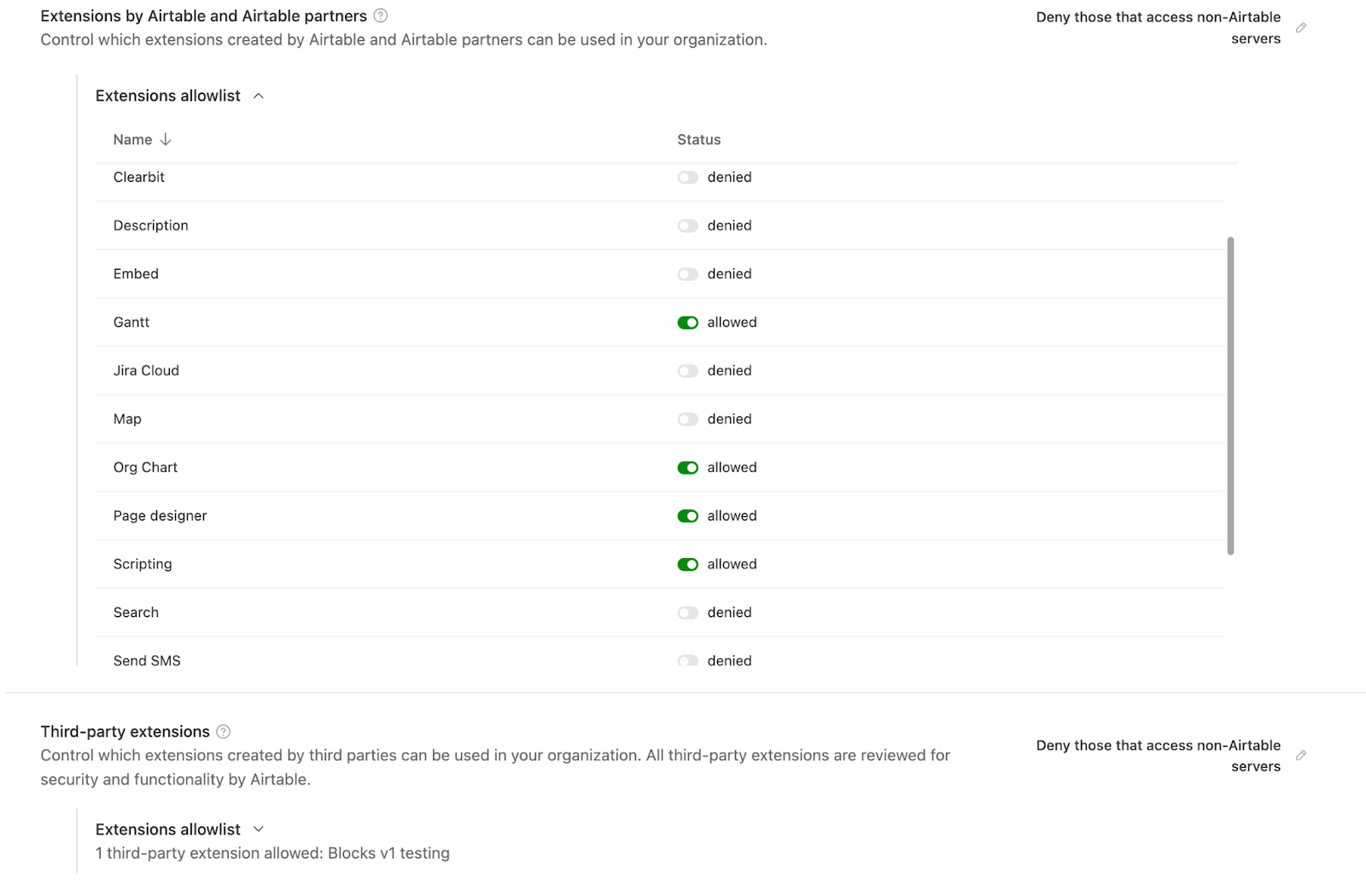
First-party and partner extensions - First-party and partner extensions that connect to third-party systems but do not store any base data in non-preferred region data centers (allowed by default):
Org chart, Scripting, Gantt, Web clipper, URL preview, Translate, Base sync, Map, Embed, Search, Flowchart, Description, Page designer, 3D space
Other first-party and partner extensions that appear in this setting send base data to third-party servers, but Airtable cannot guarantee that data used/created by those extensions is stored in your organization’s preferred region. Admins can enable/disable these extensions in the admin panel.
Third-party extensions and integrations - For third-party extensions and integrations—extensions and integrations not created by Airtable—that connect to third-party servers, Airtable cannot guarantee that data used or created by those are stored in your organization’s preferred region.
FAQs
Can I change my data region after it has been set?
Changing data regions requires migration coordination with your account team. Contact your Airtable account manager to discuss options.
Can I have different bases in different regions?
No. Data residency is set at the organization level, so all bases within an organization are stored in the same region.
How do I enable data residency for my organization?
Contact your Airtable account team or reach out to sales to discuss enabling data residency for your Enterprise Scale organization.
Which region should I choose?
Choose the region that best aligns with your regulatory requirements, compliance needs, and where the majority of your users are located. Selecting a non-US region may result in slower performance than the US, as latency can vary depending on your chosen data center.
How do I keep complex, multi-step automations reliable in a non-US region?
Bases stored in a non-US data region (Europe or Australia) can respond more slowly than bases in the default US region for some real-time operations, including automation runs and loading linked-record data. This can happen because those operations coordinate with services hosted in the US region. Some added latency is expected for cross-region setups and doesn't by itself mean there's a problem with your base.
Try triggering dependent automations on record changes, like When a record is updated or When a record enters a view, instead of fixed time delays. That way each step runs only after the previous change is saved, which keeps your automations in order even when there's extra latency.
What happens to my in-product data if I don't renew my Enterprise Scale contract which has data residency enabled?
Enterprise Scale customers with a data residency plan enabled cannot downgrade to another plan at the end of their contract. Instead, when your contract ends, Airtable will delete your in-product data from Airtable's systems, applications, databases, and servers. Contact your account team ahead of your renewal date if you have questions about this process.