Plan availability | Enterprise Scale plans only |
Permissions | Admin |
Platform(s) | Web/Browser, Mac app, and Windows app |
Related reading |
Airtable tracks AI credit consumption as events in your organization's audit log. Every time an AI feature consumes credits—whether through an AI field, automation, or the AI assistant—an "AI credit consumed" event is recorded.
These events are accessible directly in the admin panel or programmatically through the audit log events API to build custom reporting.
Viewing AI credit consumption events
Note
A single in-app action that triggers several credit-consuming operations will appear as separate line items in the audit log. For example, an automation that runs an AI field on multiple records will log one event per record processed.
To view AI credit consumption events:
Open your admin panel.
Click Reports.
Scroll to the "Audit log" section.
Select your preferred time range from the “Date” dropdown menu.
(Optional) Select a specific user (if applicable) from the “Events with a specific user” dropdown menu.
Click Search.
Enter “Credit” in the “Filter by event” field.
Credit results display each "AI credit consumed" event as a separate row. Select any event row to open a detailed view showing the full event payload.
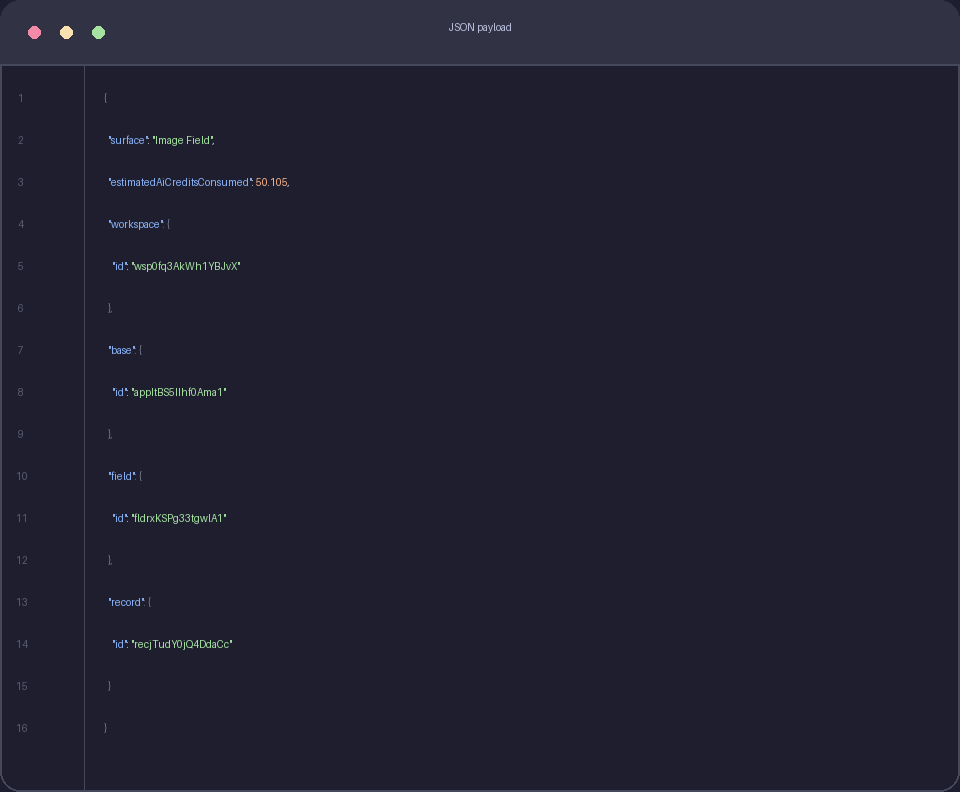
Understanding AI credit consumption event payloads
Field | Description |
|---|---|
Surface | The AI feature that consumed credits. Possible values include: Field, image field, web content field, automation, AI image automation, AI assistant, generate app, generate cover image, cobuilder customization, linked record field agent, and custom element pregeneration. |
EstimatedAiCreditsConsumed | The estimated number of AI credits consumed by the action. |
Workspace | The workspace where credits were consumed, including the workspace ID and name. |
Base | The base where credits were consumed, including the base ID and name. |
Field | The field that consumed credits (when applicable), including the field ID and name. |
Automation | The automation that consumed credits (when applicable), including the automation ID and name. |
Record | The record associated with the credit consumption (when applicable), including the record ID. |
Example payload
Building an AI credit consumption report
You can use the audit log to build a reporting framework around AI credit usage 2 different ways.
To use the admin panel to build a credit consumption report:
Open your admin panel.
Click Reports.
Scroll to the "Audit log" section.
Select your preferred time range from the “Date” dropdown menu.
(Optional) Select a specific user (if applicable) from the “Events with a specific user” dropdown menu.
(Optional) Select the "AI" event category for a broader view of all AI-related events.
Click Search.
Enter “Credit” in the “Filter by event” field.
Click the “CSV” button above the “IP address” column to download the results.
Note
For more granular reporting—like automated dashboards or integration with security information and event management (SIEM) tools—use the Audit log events API. Filter for events with the AI_CREDIT_CONSUMED event type in the AI category.
For setup instructions, see the Audit log integration guide.
AI-related audit log events
Event | Description |
|---|---|
AI credit consumed | AI credits were consumed by an AI feature. Logged after credits are successfully consumed. |
Moderate AI content | AI content violated a provider's moderation policy and returned an error. |
FAQs
Does each audit log event show how many credits an action consumed?
Yes. Each "AI credit consumed" event includes an “estimatedAiCredits Consumed" field in the JSON payload showing the estimated number of credits used by that specific action.
Are multi-step actions logged as one event or multiple?
A complex action that triggers several credit-consuming operations will appear as separate line items. For example, if an automation processes 5 records through an AI field, you'll see 5 individual "AI credit consumed" events.
Which AI features are tracked in the audit log?
Credit-consuming events are tracked for AI fields, image fields, web content fields, automations, AI image automations, the AI assistant, app generation, cover image generation, cobuilder customizations, linked record field agents, and custom element pregeneration.
How far back can I view AI credit consumption events?
Audit log events are stored and searchable for 180 days.